How I built Pulse — Understanding WebRTC by Building a Video Calling App
In this blog I have described How I built pulse and what challanges I've faced
I recently built a simple video calling web application called Pulse, which will help two individuals to join a room and start a quick video call.
My intention behind building this web app was to understand how webRTC works and how other applications streams their audio/video over the internet to other users.
What is Pulse ?
Pulse is a browser-based video calling application built using WebRTC, WebSockets, Redis, Next.js, and Node.js.
Users can:
- Join a room
- Connect with another user
- Exchange audio and video in real time
- Communicate directly using a peer-to-peer connection
it allows two users to establish a direct connection without routing the media through a central server (in most cases), resulting in low-latency communication.
checkout pulse: https://pulse.shaikshoaib.site
What exactly is WebRTC?
WebRTC (Web Real-Time Communication) is a browser-native Web API that enables real-time audio, video, and data communication between browsers.
Instead of installing a library, modern browsers already provide APIs such as:
RTCPeerConnectionRTCDataChannelgetUserMedia()
These APIs allow browsers to establish secure peer-to-peer connections without requiring media to flow through your backend server.
But here’s something that confused me when I first started:
If two browsers are on different networks, how do they even discover each other?
How webRTC works ?
Let us consider 2 different users, both on 2 different machine and network wants to communicate with each other. in-order to connect them we need some common ground and here comes the role of signalling server.
The role of the signalling server
WebRTC can transmit media directly between two peers.
What it cannot do is help two strangers find each other.
A signalling server solves this problem.
Think of it as a receptionist introducing two people before they start talking.
The signalling server is responsible for exchanging connection information between clients.
Once both peers know how to reach each other, its job is essentially finished.
In Pulse, I use WebSockets for signalling because they provide low-latency, bidirectional communication that’s perfect for exchanging connection information.
It’s important to understand that the signalling server never processes audio or video.
It only forwards messages between clients.
What is SDP ?
SDP (Session Description Protocol) is a text-based description of a peer’s communication capabilities.
Think of it as a resume or profile that a peer sends to another peer before they start communicating.
It contains information such as:
- Whether the peer wants to send audio, video, or both.
- Which audio and video codecs it supports (e.g., Opus, VP8, H.264).
- Network information (IP addresses and ports).
- ICE candidates (or instructions for discovering them).
- Encryption and security details.
- Other parameters needed to establish the connection.
The browser generates this SDP automatically—you don’t write it yourself.
Why do we need SDP?
Imagine two people trying to have a conversation:
- One speaks only English.
- The other speaks only Spanish.
Before they can communicate, they need to know what languages each person understands.
Similarly, before two browsers can exchange audio and video, they need to know each other’s capabilities. SDP is the document that describes those capabilities.
How is SDP exchanged?
The browser creates an SDP and sends it to the other peer through the signalling server.
The process looks like this:
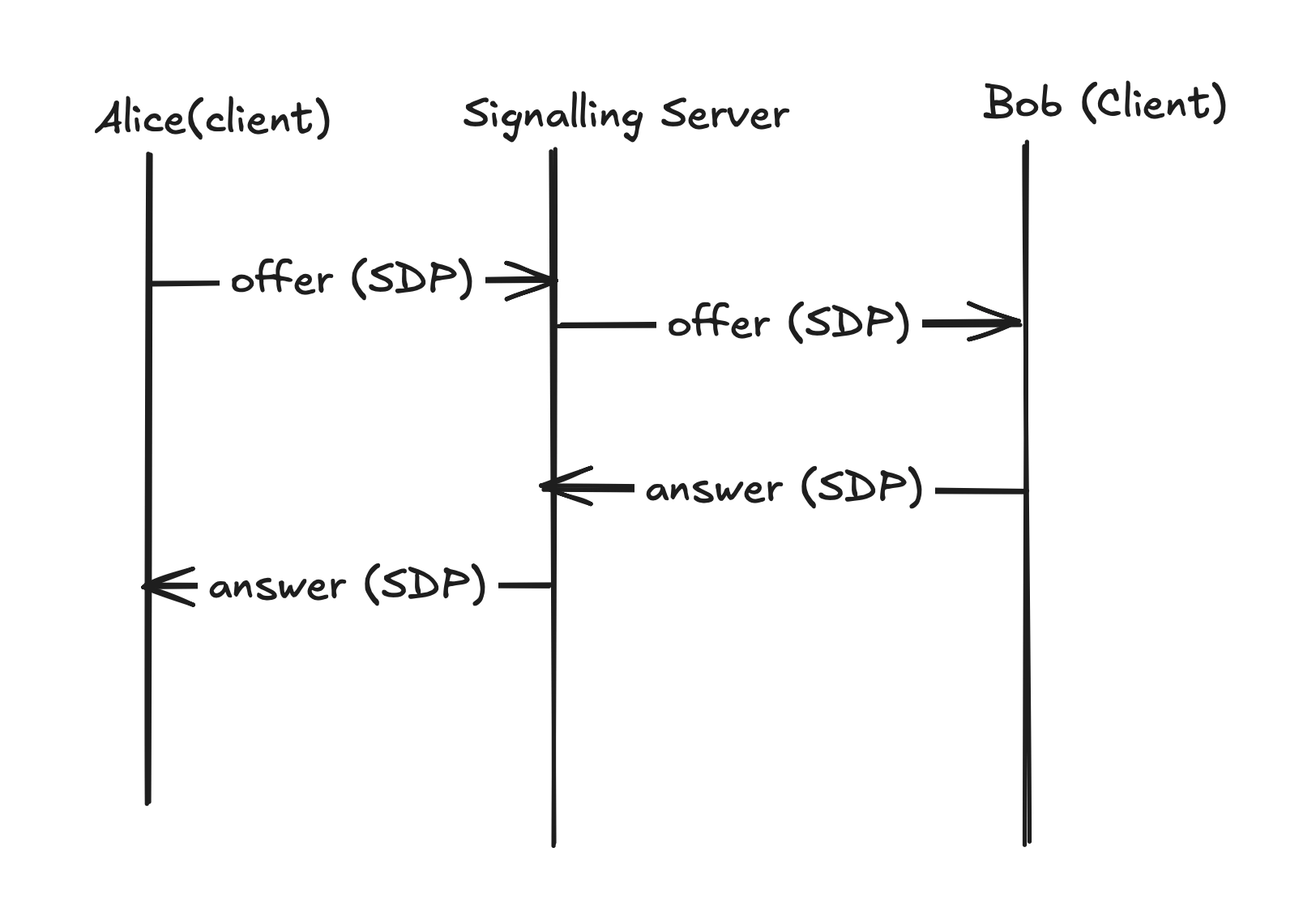
Notice that the signalling server only forwards the SDP. It does not process the media.
Once both peers have exchanged SDP (and later ICE candidates), they know how to establish a direct WebRTC connection.
Example SDP
v=0
o=- 46117317 2 IN IP4 127.0.0.1
s=-
t=0 0
a=group:BUNDLE 0 1
m=audio 9 UDP/TLS/RTP/SAVPF 111
a=rtpmap:111 opus/48000/2
m=video 9 UDP/TLS/RTP/SAVPF 96
a=rtpmap:96 VP8/90000
You don’t need to understand every line. The browser generates this automatically, and WebRTC uses it to negotiate how the connection should be established.
How Pulse finds the correct user ?
You might be thinking how does the client know which client to connect ? there can be lots of people using the application and how will I know whom to connect, to solve this I am using a websocket concept called room.
websocket room allows to connect multiple users to connect to a single group/room.
here’s the flow.
When a user joins Pulse, they enter an email address and create a room.
On the backend, I maintain two mappings inside Redis:
- Email → Socket ID
- Socket ID → Email
These mappings allow me to quickly identify which socket belongs to which user.
When another user joins the same room, the signalling server already knows both participants and can forward signalling events between them.
Redis is a great fit here because these mappings are temporary, require extremely fast lookups, and disappear once users disconnect.
Signalling flow inside Pulse
- User A joins a room.
- The server stores the user’s Socket ID.
- User B joins the same room.
- The server notifies User A.
- User A creates an SDP Offer.
- The Offer is forwarded through WebSockets.
- User B generates an SDP Answer.
- The Answer is sent back.
- Both peers exchange ICE candidates.
- A direct peer-to-peer connection is established.
- Audio and video begin flowing directly between the browsers.
Below diagram can help you understand it further. You will notice there is an event called nego-offer, the reason is when two clients know each other you’ll need to re share the offer and answer. well thats how it works.
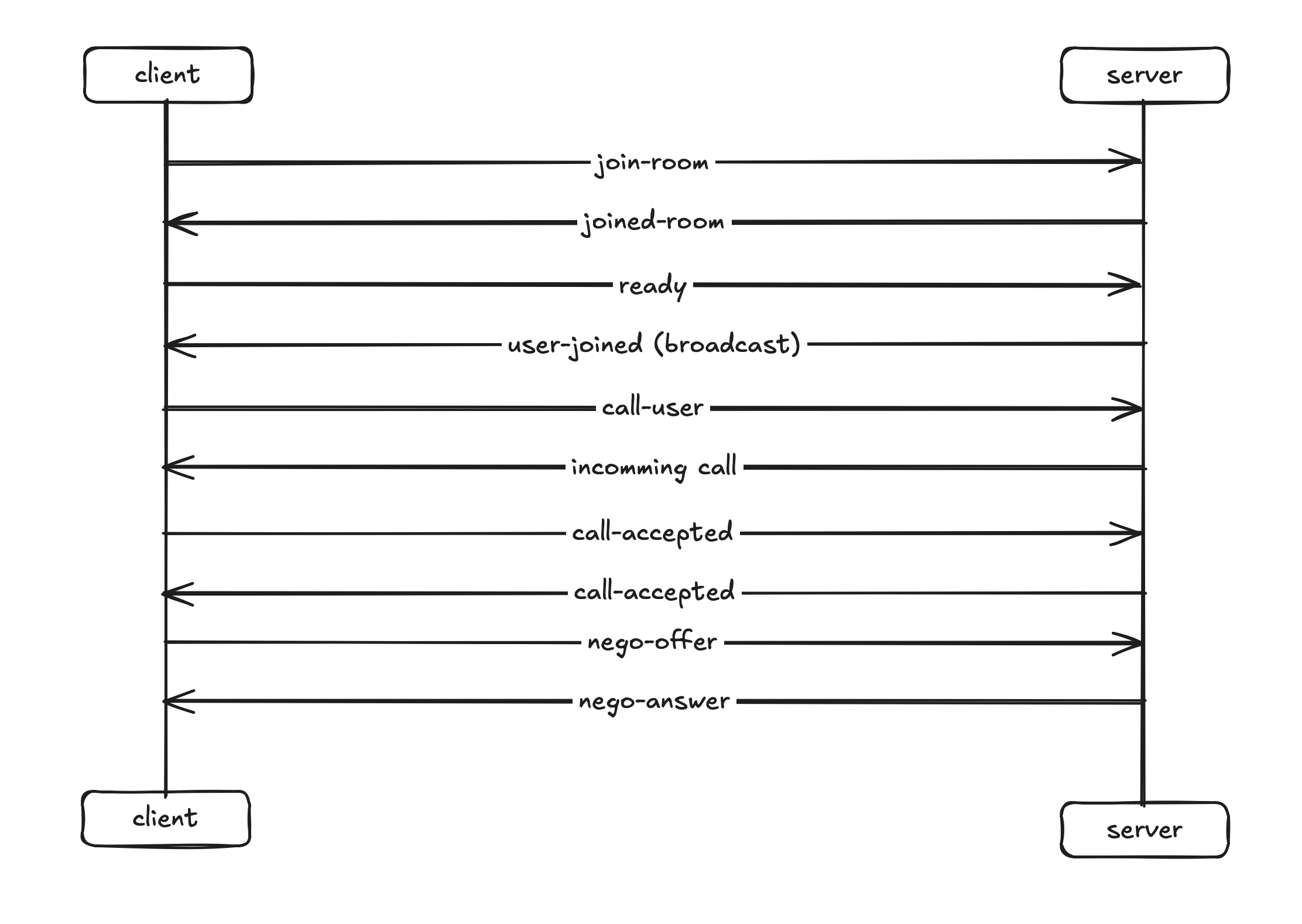
Basically signalling server is acting as a mediator to communicate between 2 clients. think of it like a table tennis game.
- Two players are the browsers.
- Table is you signalling server.
- The ball represents signalling events.
The table doesn’t decide how the players play. It simply provides a medium for the ball to move between them.
Similarly, the signalling server simply forwards messages until the browsers establish a direct connection.
A Bug I’ll Never Forget
Your building a product and you don’t get any error, thats impossible. but one bug which I will always remember:
InvalidAccessError: Failed to execute 'setRemoteDescription' on 'RTCPeerConnection': Failed to set remote offer sdp: The order of m-lines in subsequent offer doesn't match order from previous offer/answer.
By this time I added end call functionality, so when I was ending call using “End Call” button I was not able to join another room. When I refreshed the page it worked.
After hours of debugging I realised the main issue was React’s useEffect.
I was passing an empty dependency array :D
After closing the first connection I was not creating new RTCPeerConnection. The issue feels very stupid but I helped me understanding that every new call requires a new RTCPeerConnection.
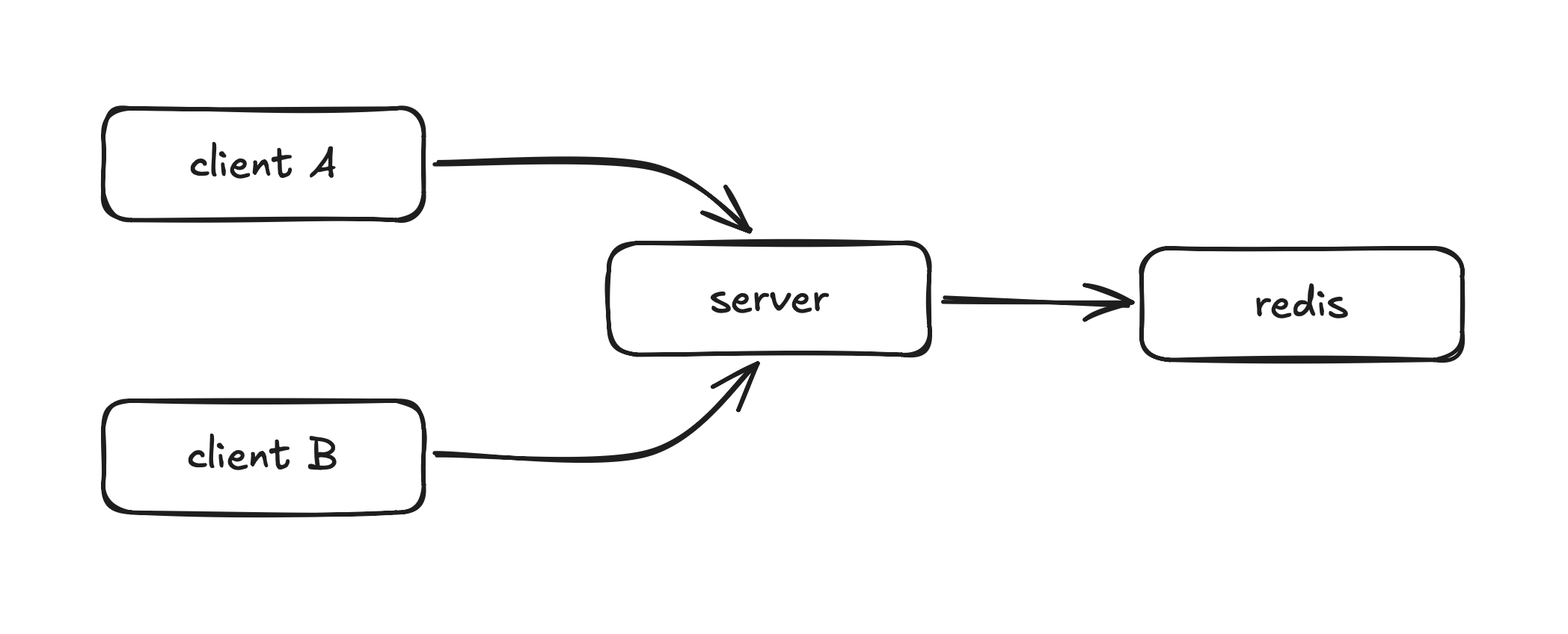
Check the below Architecture of pulse.
Why Redis ?
Initially, I stored the email-to-socket mappings in a JavaScript Map. While it worked during development, all mappings disappeared whenever the server restarted.
I considered storing them in a traditional SQL or NoSQL database, but these mappings are temporary and need to be read and updated extremely quickly.
Redis turned out to be the perfect fit. It’s an in-memory data store designed for fast lookups, making it ideal for short-lived session data like socket mappings.
What I learned
After building pulse I realised WebRTC isn’t rocket science.
Behind every video call is a sequence of well defined steps:
- Discover another user
- Exchange SDP
- Exchange ICE candidates
- Negotiate media
- Establish a secure peer-to-peer connection
- Stream audio and video directly
Understanding these concepts by building a real application gave me a much deeper appreciation for how applications like Google Meet and Microsoft Teams work.
Pulse is only the beginning.
My next project is Colab, where I’ll move beyond peer-to-peer communication and build a scalable video conferencing platform using an SFU (Selective Forwarding Unit) architecture capable of supporting multiple participants.